Our latest webinar “The Silver Bullet for Internal Communications” covered a pertinent topic with the prevalance of remote working and how your organisation can unleash the most powerful, yet under-utilised tool in your internal comms arsenal – Microsoft 365 & Teams.

Face to face communication can be a challenge in the easiest of times, yet it is vital in helping colleagues feel valued and part of an organisation. As more and more businesses find themselves working remotely, either as a result of the pandemic or normal business practice, maintaining the connection between colleagues, managers and leaders intensifies. A cost effective and fit for purpose digital solution is crucial.

With special guests Sarah Edwards, Fabrica Group and Clare Milsom, Ocuix, our focus for this event was delivering targeted communications to a range of audience groups, based on the fundamental principles of engagement, experience and motivation.

We demonstrated how a blend of interactive Microsoft technologies, strategic internal communication planning and dynamic aesthetics will enable you to connect and engage colleagues with business goals, activities and programmes.

Whatever the mix of working arrangements you have in place – home-based, field, office locations or a combination – we can explain how to communicate effectively with your teams and colleagues, through a continuous, engaging and integrated stream of content hosted via Teams.

Specific Microsoft technologies to be covered:

  • SharePoint Online
  • Microsoft Teams
  • Teams Live Events
  • Microsoft Stream

The Silver Bullet for Internal Comms

About Hugh Valentine:

Over 10 Years deploying Microsoft & Cloud Technologies for Customers & Partners. Loves cycling and raising money for charity. Managing Director of Valto.

Areas of expertise:

modern workplace IT, digital transformation, Microsoft services, technology adoption, IT strategy, flow, cloud roadmap, cloud automation, cloud security and much more.

About Sarah Edwards:

An accomplished internal communication, engagement and change expert, and founder of Fabrica Group, Sarah has over 20 years’ experience in helping businesses piece together strategy and objectives with people and the way they work.

Areas of expertise: Strategy development and deployment; Internal communications; Employee engagement; Cultural analysis and change; Coaching and facilitation; Leadership and employee events and conferences; Certified Myers Briggs practitioner; Accredited change management practitioner; Certified Hogan practitioner

About Clare Milsom:

Clare is an award-winning Producer working in the corporate communications and events industry. Having started her career as a graphic designer in the late 90s, Clare has evolved a particular talent for understanding complex technical information and communicating it by developing strong creative message architectures with visual clarity. Clare has a thorough understanding of the creative tricks and broadcast technologies that turn a video call into a digital event.

Areas of expertise: Graphic design; video and event production and delivery.

Microsoft 365 Services for Internal Communications

Valto provide a range of services including:

Using SharePoint for internal communications

Using SharePoint for internal communications can take your business collaboration to a whole new level. SharePoint has been designed with innovative collaboration in mind. With content management and teamwork applications, utilising SharePoint to the fullest will connect all your Microsoft tools and encourage easy file sharing and communication.

This powerful software makes it easy for your team to co-author documents and connect with remote workers and those in other offices. The expert SharePoint consultants at Valto can offer remote IT support for SharePoint and all other Microsoft products. Read on to discover our top tips for using SharePoint for internal communications.

Gather around the discussion board

The Discussion Board found within SharePoint is the perfect place to promote discussion and teamwork. This intuitive program allows you to start a conversation and discover the opinions of your staff in real time. Discussion Boards only take minutes to set up and can save time in place of an in-person group meeting.

Develop a shared Wiki Library

Creating a Wiki Library is a fantastic way to connect your staff and organisational information using SharePoint. A Wiki Library is a shared database of documents that users can access and edit. Your library will grow organically as you link more documents together. This is also an excellent way to see what information you lack. You can then create the pages that you need.

Be heard with the Announcement List

The Announcement List in SharePoint allows you to make important announcements to your staff with absolute simplicity. By setting expiry dates, you can also pre-plan your monthly announcements to save time. Putting your group Announcement List on the landing page of your SharePoint Intranet makes it easy for every member of staff to see your announcements.

Create a SharePoint Survey

Creating surveys is the quickest and easiest way to get the opinions of your team. With question branching, stored answers and Excel exportability, managing your findings is also incredibly easy. Anonymous surveys are a perfect way to encourage interaction from shy and quiet members of your team.

Use a SharePoint Community site template

Using a SharePoint Community Site Template to create a centralised social media style network allows you to connect with your staff in a familiar way. Whether it’s for team discussion or around a specific topic, this is a great way to encourage engagement. You can use the SharePoint Community Site Template to implement and encourage Microsoft gamification.

Contact Us

We hope you found our “Microsoft 365 & Teams for Internal Communications” blog post useful. Valto are here to help with your Microsoft 365 Internal Communications Challenges. Get in touch via 03335 779 009, [email protected] or Contact Us.
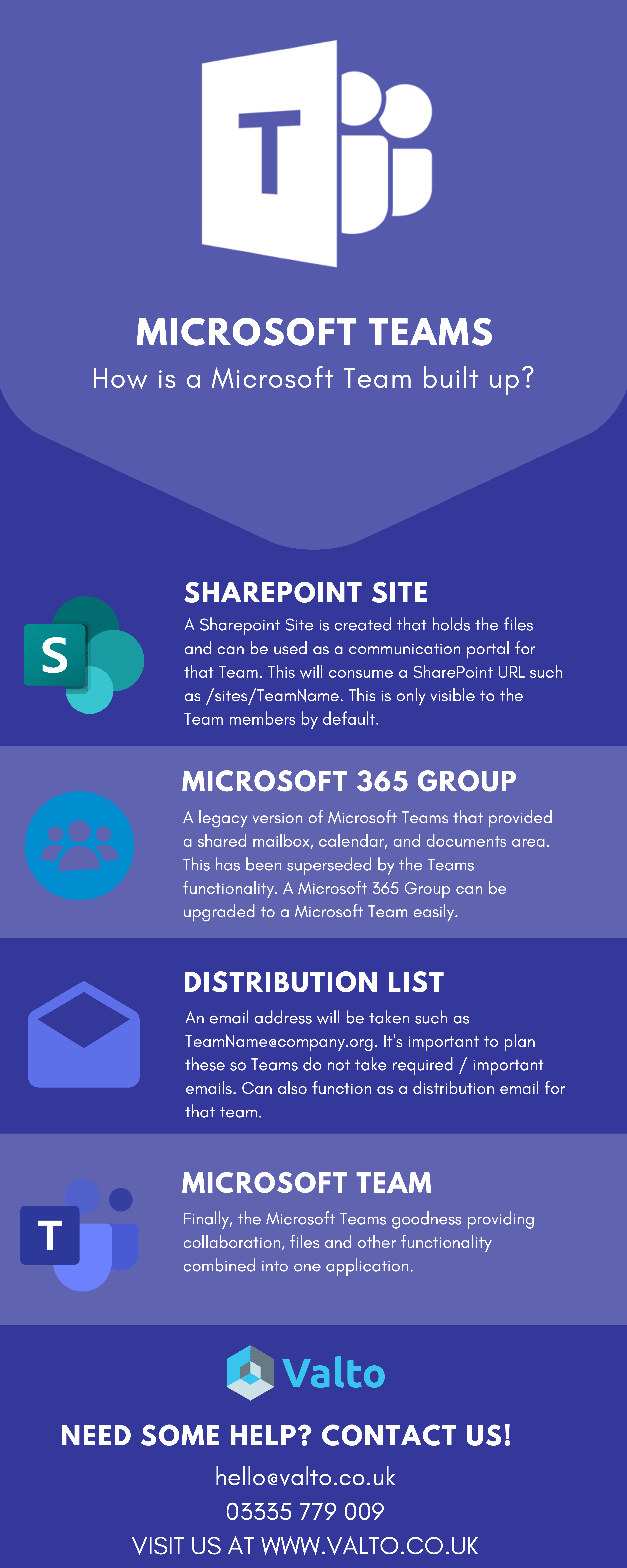
What components of Microsoft 365 are used in Microsoft Teams? Our article covers the key components that get created for a Microsoft Team.

Microsoft Teams is included with your Office 365 subscription and it’s important to consider from a governance perspective to understand How is a Microsoft Team Built Up?

What are the key components of a Microsoft Team?

The infographic below outlines the key functions of a Microsoft Team:

How is Microsoft Teams Built up?

Microsoft Teams Services

Valto provide a range of Microsoft Teams services including:

  • Training
  • Structure & Governance Workshop
  • Security
  • Support
  • Microsoft Teams Request Form

Blog Series

This blog post is part of a series of blog posts outlining Microsoft Teams best practices including:

Get in Touch

We hope you found our “How is a Microsoft Team Built Up?” blog post useful. Valto are here to help with your Microsoft Teams platform. Get in touch via 03335 779 009, [email protected] or Contact Us.

What types of Microsoft Teams to create? This is a question we often get asked, our article covers the common use cases for deploying Microsoft Teams that we have seen across our many projects with organisations.

Microsoft Teams is included in all Microsoft 365 plans and an important factor for organisations to consider when rolling this out is ensuring a good structure and governance plan is in place. There are also a number of enhanced addons such as Microsoft 365 Business Voice which aids telephony for businesses or organisations.

How should I deploy Microsoft Teams?

The following Microsoft Team Types are the most common ones organisations deploy.

How should I deploy Microsoft Teams?

Departmental

These types of Teams provide departments a place to streamline their way of working. Replacing internal emails & communications with group chats, hosting regular department meetings and migrating their files into the platform.

Project / Ad-hoc

Project & Ad-Hoc Teams are ideal for cross department functions and even external parties like suppliers & partners. Map out your project and use it to improve collaboration on your project using meetings, files and planner for task management.

Company Wide

Invite your whole organisation to a Microsoft Team and use it for posting important announcements, praising members of staff and providing easy access to a SharePoint Online Intranet.

Social & Initiatives

Create social Teams for your employees to engage on topics they are interested in and drive company wide initiatives such as a mental health campaign to really drive social and company wide feedback

Microsoft Teams Services

Valto provide a range of Microsoft Teams services including:

  • Training
  • Structure & Governance Workshop
  • Security
  • Support
  • Microsoft Teams Request Form

Blog Series

This blog post is part of a series of blog posts outlining Microsoft Teams best practices including:

Contact Us

We hope you found our “What types of Microsoft Teams to create?” blog post useful. Valto are here to help with your Microsoft Teams project. Get in touch via 03335 779 009, [email protected] or Contact Us.


Microsoft 365 Licensing has recently been updated which has caused confusion. However, longer term the new Microsoft 365 licensing model should be simpler and easier for people to understand.

Microsoft 365 Licensing

About the Microsoft 365 Licensing & Recent Updates

This is the journey of how we got to the Microsoft 365 Licenses and the different plans and rebrands that have occurred.

  • Office 365 – The Office 365 Business Essentials and Business Premium were the first set of licenses that enable Office 365 services including Exchange, SharePoint, OneDrive, and Office installations.
  • Enterprise Mobility & Security –Microsoft then released a set of enhanced security packages including Azure AD Premium, Conditional Access, InTune & Azure Information Protection. These are available as addons to Office 365 licenses.
  • Microsoft 365 – This new license released in 2018 provided Office 365, Windows 10 Upgrades and Enterprise Mobility & Security features into a new bundle that was more cost effective than purchasing separately. This product also launched Microsoft 365 Business providing more security features at the business market (less than 300 users).
  • Licensing Rebrand – Finally on April 21st 2020 the licenses were renamed to simplify the separate licenses within Office 365 and Microsoft 365. Microsoft said, 'This new approach to naming our products is designed to help you quickly find the plan you need and get back to your business'. The licenses have been renamed as follows:
    • Office 365 Business Essentials became Microsoft 365 Business Basic.
    • Office 365 Business Premium became Microsoft 365 Business Standard.
    • Microsoft 365 Business became Microsoft 365 Business Premium.
    • Office 365 Business and Office 365 ProPlus will both become Microsoft 365 Apps. Where necessary we will use the “for business” and “for enterprise” labels to distinguish between the two.

A lot of our clients get in touch struggling to understand exactly what each plan includes and how what the features do.

We are releasing a live link to a spreadsheet that will be updated when new features/changes come up which you can sign up for below:

Microsoft 365 Licensing Sheet Download

    The licenses have been outlined below in a friendly table format:

    Microsoft 365 Licensing Business Plans

    What's Included? Description Microsoft 365 Business Basic Microsoft 365 Business Standard Microsoft 365 Business Premium Microsoft 365 Apps for Business
    Cost Per User / Per Month £3.80  £9.40  £15.10  £7.90
    Users Maximum Number Licenses 300 300 300 300
    Office Online  
    Office Client  
    Exchange  
    SharePoint Storage 1TB + 10GB Per User
    OneDrive for Business  
    Microsoft Teams  
    Planner  
    To Do  
    Yammer  
    Stream  
    Bookings  
    MileIQ  
    InTune  
    Azure AD – Conditional Access   P1
    Azure AD – SSO   P1
    Azure Information Protection   P1
    Autopilot  
    Windows 10 Upgrade  
    Office 365 ATP   P1

    Microsoft 365 Licensing Enterprise Plans

    Whats Included? Description Microsoft 365 E3 Microsoft 365 E5 Microsoft 365 F3 Microsoft 365 F1
    Cost Per User / Per Month  £28.10  £48.10 £7.50 £3.02
    Users Maximum Number Licenses Unlimited Unlimited Unlimited Unlimited
    Office Online  
    Office Client  
    Exchange  
    SharePoint  
    OneDrive for Business  
    Microsoft Teams  
    Planner  
    To Do  
    Yammer  
    Stream  
    Bookings  
    MileIQ  
    InTune  
    Azure AD – Conditional Access   P1
    Azure AD – SSO   P1
    Azure Information Protection   P1
    Autopilot  
    Windows Virtual Desktop Rights  
    Windows 10 E3 & Upgrade  
    Office 365 ATP  
    Windows Defender  

    Relevant Materials & Videos

    Our upcoming webinar explains the key security products available in Microsoft 365. Join here: https://www.eventbrite.co.uk/e/securing-microsoft-365-tickets-104987351996

    Microsoft 365 Products Overview for Non Profits: https://www.youtube.com/watch?v=mNi09HqIE7w

    Contacts Us

    Valto offer a free 45-minute overview of the licenses, what features are available and how to get the most out of the platform. Book a demonstration today with a Microsoft 365 Specialist you can call, email, contact us.