Video Guide for Microsoft 365 Adoption
Learn best practices, tips, and tricks from Microsoft 365 specialists Valto as part of our Microsoft 365 Masterclass: Adopting Microsoft 365.
About this Video – Training for Microsoft 365
Our Microsoft 365 Masterclass Series is a new webinar series from Valto. Our series aims to help organisations get the most out of their subscriptions including developing a strategy, adoption the platform, improving security and a dive into key technologies.
Our second event covers off how your organisation can go about adopting Microsoft 365 and get the most value out of their Microsoft 365 Investment
During the webinar we will cover off the following key topics:
- Vision Planning
- Change Management & Communication
- Champions
- Resources
- Certifications
During the webinar we’ll be focusing on key processes you can implement and demonstrating the following key Microsoft 365 technologies:
- Exchange
- OneDrive
- SharePoint Online
- Microsoft Teams
- The Power Platform (Power Apps, Power Automate & Power BI
- Other Services including Forms, Planner, Yammer
Who is this video for?
This video is aimed at organisations that have Microsoft 365 and would like to get more out of their investment. We’ll cover off best practices, tips and tricks to help your organisation and users adopt the Microsoft 365 platform.
Example Adoption Strategy Vision
Office 365 Vision
Office365 will provide a centralised environment where all activities, documents and policies are stored in an intuitive manner. The platform will enable users to collaborate more effectively and find information with ease.
Microsoft Teams Vision
Microsoft Teams will be used as our primary communication channel and replace all internal emails. The platform will be used to improve communications and collaboration across departments, projects, and companywide engagements.
Resources
- Download the presentation – Click Here
- Microsoft Service Adoption Course
- Learning Pathways
Contact Us
Valto are here to help with your Adoption projects. Get in touch via 03335 779 009 or Contact Us.
Microsoft SharePoint in 2021
SharePoint Success Site
The SharePoint Success site is a new look book template from Microsoft that builds upon other sites such as the Microsoft 365 Learning Pathways. It is designed to help organisations that are looking to rollout SharePoint improve the quality and impact of the sites they are designing.
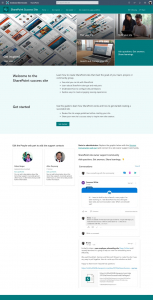
Here you can get a free SharePoint Success template.
We can help deploy this as part of our SharePoint Intranet and Consulting Services.
SharePoint Home Site App – Teams
This will provide organisations greater integration with SharePoint from Microsoft Teams. This will also remove the issue with the global navigation not appearing within Teams which has been a major limitation. This will involve promoting a communication site to a home site for this functionality to work.

More details on this announcement can be found on the Microsoft Tech Community Blog.
SharePoint Spaces
Launched at the end of 2020 but will be improved over the coming year. This platform will provide organisations the opportunity to provide mixed reality experiences in Modern SharePoint Sites. This could be for virtual tours, training, classroom or providing a creative way to demonstrate products and services.
Get more details on SharePoint Spaces.
SharePoint Syntex
This new product set is an enterprise product set designed to provide Machine Learning and AI to assist with automated classification and protection of content within SharePoint.

This product set will streamline organisations that are manually manipulating and classifying data and metadata or using a third-party product to achieve this.
SharePoint Syntex | Microsoft 365
SharePoint News Improvements
News / Publishing
Improvements to the News & SharePoint panel asking users to complete missing fields prior to publishing and allowing for further automations with Power Automate once complete.
New template functionality is also being included with the ability to set a new default news/page template for sites.
News Digest Improvements
Auto News Digest – Building upon the manual News Digest functionality this feature will automatically email organisations with updates to the news articles that have been posted within SharePoint.
News Banner and Logo improvements are also being added to the News Digest functionality to allow further customisation to this. Much simpler than emailing yourself the News Digest and editing it first! See User Voice on this subject.
OneDrive
Mac Improvements
A host of new features are coming for Macs on OneDrive including:
- SSO & Conditional Access for OneDrive on Mac
- Files on Demand is coming out of beta and becoming GA
Differential Sync
This feature will streamline the amount of data that is being synced and will allow for differential sync for all file types.
Comments on non-office documents
Within SharePoint & Teams web application you can now provide comments to non-Office files from OneDrive. This is already launched and you can read more on how to use this.

Microsoft Teams in 2021
There is a host of new features coming to Microsoft Teams this coming year as Microsoft invests heavily into the new platform. Just a selection of these include:
Teams Custom Layouts
This will build on the blur and change background features to allow users to create more immersive presentations with themselves transposed into the scene.

Meeting Recap
A very exciting feature that will provide a lot of productivity gains allowing a summary of the meeting, who attended, who did not and shared files, recordings and chat. This will also include automated actions in the future too.
Enhanced Integrations
Enhanced integrations with the PowerApps Power Platform and SharePoint:
- Approvals
- Power Automate App
- Power BI
More Details
You can see What’s New in Microsoft Teams from Microsoft’s announcement page.
EndPoint
Microsoft Defender provides New Features for centralised management of Microsoft Defender included with your Microsoft 365 Business Premium plan.
Get in Touch – We can help with your 2021 Projects.
Valto are here to help with your 2021 projects. Get in touch via 03335 779 009, [email protected] or Contact Us.
Our Microsoft 365 Masterclass Series is a new webinar series from Valto. Our series aims to help organisations get the most out of their subscriptions including planning a Microsoft 365 Strategy, adoption the platform, improving security and a dive into key technologies.
The first event in our Microsoft 365 Masterclass series is “Planning a Microsoft 365 Strategy” and how you can create an effective plan for the next 12-36 months.
365 Strategy Planning Webinar Video
Key Topics – Defining an effective Microsoft 365 Roadmap
The important considerations when defining a roadmap and strategy are as follows:
- Governance – Key areas to define governance policies including defining SharePoint & Teams structures and limiting key settings that make governance difficult to enforce.
- Adoption – Defining an effective adoption strategy including communication, training, champions and resources.
- Security – Implementing an effective baseline of security for Microsoft 365 and rolling this out across your Microsoft 365 platform allowing additional services to easily be enabled.
- Migration – Best practices for migration of files from legacy platforms to Office 365 Services.
Generally, as part of any Microsoft 365 planning you need to consider the toolsets that are available, we often break these down into two categories
Productivity Tools
Productivity tools enable users to get the most out of the platform and provide productivity benefits and functionality to streamline the user’s way of working including:
- Exchange
- OneDrive
- SharePoint Online
- Microsoft Teams
- The Power Platform (Power Apps, Power Automate & Power BI)
- Other Services including Forms, Planner, Yammer
Security Tools
Security tools ensure the Microsoft 365 is secure and aligned to the objectives and company policies including:
- Enterprise Mobility & Security
- Conditional Access
- Azure AD
- InTune
- Azure Information Protection
- Advanced Threat Protection
Get in Touch – Start your Microsoft 365 Master Plan with Valto
All of the products outlined above our included in a Microsoft 365 Business Premium license. Valto are here to help with your Microsoft 365 Strategy Planning. Get in touch via 03335 779 009, [email protected] or Contact Us.
 UK Offices
Chester:
8 Hunters Walk, Canal Street
Chester, CH1 4EB
Southampton:
Royal Mail House, Terminus Terrace
Southampton, SO14 3FD
London:
Kemp House, 152 – 160 City Road
London, EC1V 2NX
 US Office
North Carolina:
5540 Centerview Dr Ste 204 PMB 38792 Raleigh, 27606-8012



Company no: 10625574. VAT no: 264817775. All Rights Reserved. Services Sitemap | XML Sitemap